
Cowork can update Planner. “Done” still needs a second look.
The new Planner plugin can help with tasks and deliverables. Review the work before approving the progress update.
There is a difference between finishing the work and making the task board look finished. Most organizations have had plenty of practice with the second one.
Copilot Cowork now has a Planner plugin in Microsoft’s November feature list. The useful question is what you review before a task changes.
Planner becomes part of the conversation
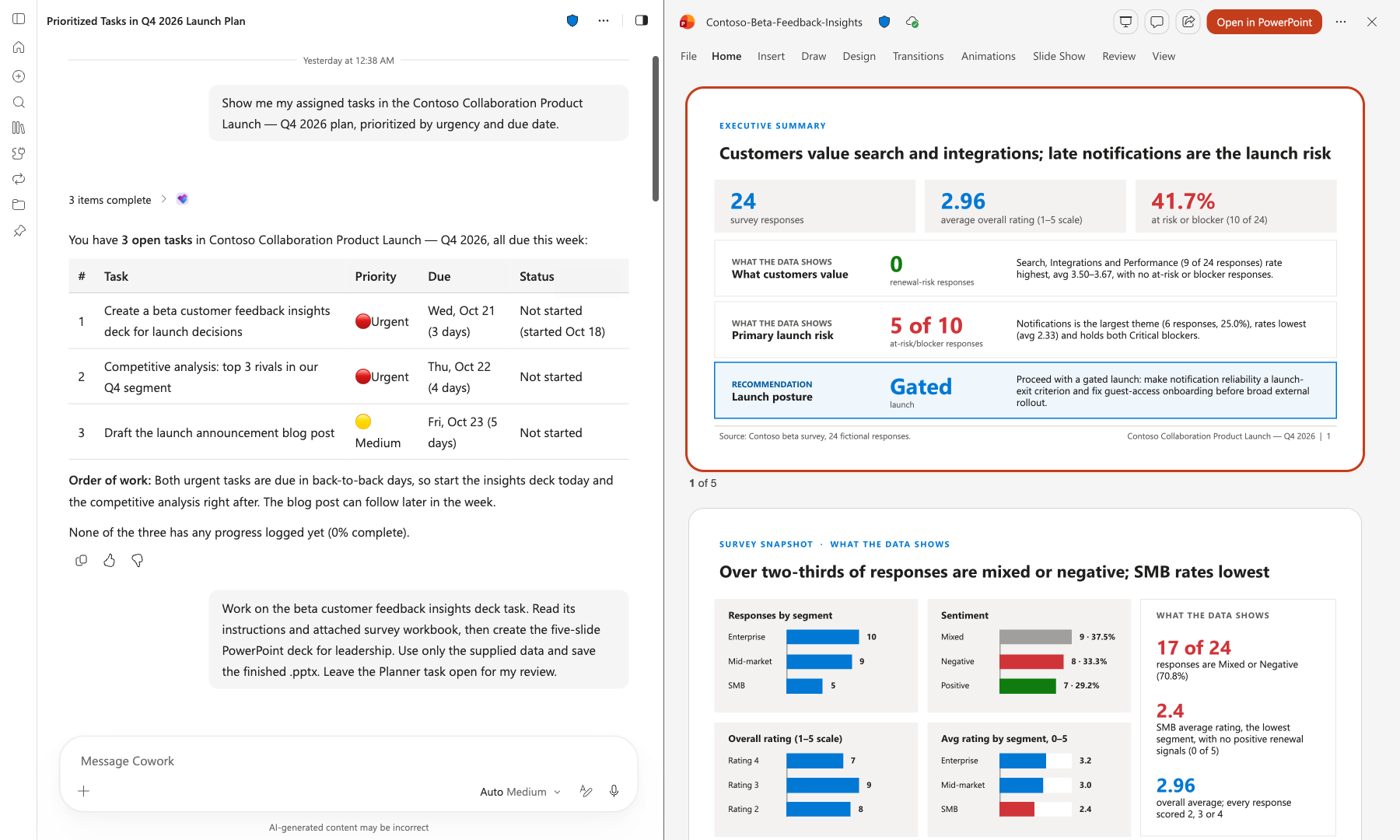
Microsoft’s Planner plugin guide describes prioritizing assigned tasks, turning files into plans, and using task notes, checklists and attachments to help produce deliverables. Cowork can update progress and complete tasks after approval.
The documented location is Microsoft Copilot → Plugins → Cowork. You need a Microsoft 365 Copilot license, Cowork access and an organization that allows the plugin. A work account alone does not establish those conditions.
Microsoft says Cowork shows proposed Planner changes before applying them, and can access only plans and tasks the user already has permission to see. That approval step deserves more attention than a hurried click on the way to the next meeting.
View Microsoft’s screenshot: Planner tasks alongside a generated presentation. Source: the Microsoft Support guide above, checked November 8, 2026; screenshot capture date not supplied. This is Microsoft’s example, not our own test.
Try one task before handing over the board
Here is an illustrative first prompt:
Review the tasks assigned to me in [plan]. Choose one that needs a draft document. Explain which notes and attachments you would use, identify anything missing, and propose a draft. Do not change Planner yet.
Then read the actual draft. Does it answer the task? Are its sources right? Has somebody confused a polished first version with a finished deliverable?
Only after that should you review any proposed progress update. This is a suggested test, not a workflow we have run. Check your organization’s Cowork spending arrangements too; plugin availability is not a promise of unlimited included usage.
The green checkmark should follow the work. It should not be the most convincing part of it.